 SlowPBX
The call log
Every call, and what happened to it.
The Call Log page answers the question an office is asked most often about its phones: “I called on Tuesday and nobody picked up.” It shows when the call came, where it went, who answered or didn’t, and how it ended. Administrators and owners see it.
What is kept
Every call is logged: calls from outside, calls placed to outside numbers, and calls between extensions. For each one the log keeps:
- the outside number, with the caller’s name when the phone network supplied one, and which of your numbers was called;
- when it started, was answered and ended;
- every phone it rang and who answered;
- each step on the way: the menu, a transfer, a park, voicemail;
- how it ended and who hung up.
It never keeps the sound of a call. Calls are kept for 13 months, then deleted. The log is part of the nightly backup.
Searching
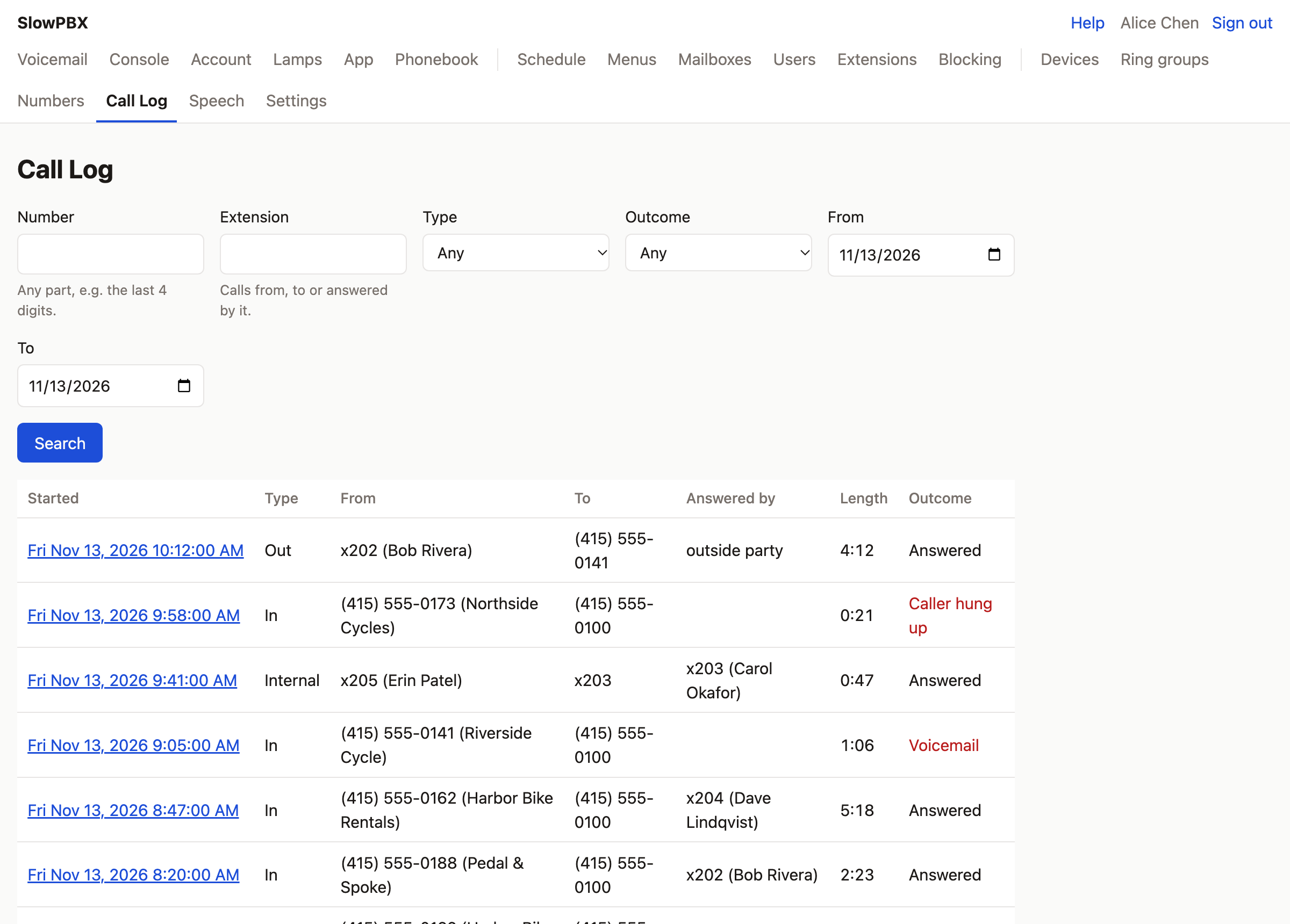
The page opens on the newest calls. To find one, fill in any of the fields and press Search:
| Number | Any part of an outside number. The last four digits are usually enough. |
|---|---|
| Extension | Calls from it, to it or answered by it. |
| Type | In from outside, Out to an outside number, or Internal between extensions. |
| Outcome | How the call ended; see below. |
| From, To | Dates, in the office’s time zone. Either can be left empty. |
The list shows the newest 200 calls that match, and says so when there are more. Narrow the search, usually by date, to reach older ones.
Reading the list
Each row is one call, newest first. An extension is written with an x and its person’s name, as in “x204 (Dave Lindqvist)”. Answered by is the person who picked up; on a call placed to an outside number it says “outside party”. Length is the whole call, from its start to its end. A call that nobody answered has its outcome in red.
Outcomes
| Answered | Someone picked up. |
|---|---|
| No answer | It rang and nobody picked up. |
| Caller hung up | The caller gave up before anyone answered, in the menu or while phones rang. |
| Voicemail | The call went to a mailbox. |
| Checked voicemail | Someone called in to listen to their messages. |
| Busy | The number called was busy. |
| Unavailable | The extension called had no phone to ring. |
| Blocked | The system refused the call: an outside caller stopped by the blocking rules, or a call out to a number or beyond a limit that isn’t allowed. |
| Not in service | The number dialed doesn’t exist. |
| Announcement only | The caller heard a recorded message and the call ended, for example a menu that says the office is closed. |
| Rejected | The call was refused before it was answered. |
| Failed | Something went wrong and the call couldn’t be connected. Open the call to see what. |
| In progress | The call is still going on. |
One call’s details
Press a call’s time to open it. The page has three parts:
- The summary: who called whom, when it started, was answered and ended, its length and how long people actually talked, the outcome and who ended it.
- What happened: each step in order with its time, such as the menu answering, phones ringing, a hold, a transfer, a park or a message left.
- Legs: each phone or outside line that was part of the call, with when it rang, answered and hung up, and why it hung up.
This is the page to read when someone says a call was dropped or never rang: it shows which phones were tried and what each did.
Who sees it
Only administrators and owners. The log holds the names and numbers of everyone who called, so it is treated as private:
- Every search and every call opened is recorded, with who looked and when. A search by number records only the number’s last digits.
- Searches are never part of a page’s address, so a number doesn’t stay behind in a browser’s history.
- The server’s own technical logs never hold a whole number or a name; the full record is only here.