 SlowPBX
The Settings page
The system-wide settings, for owners only.
Each section folds closed and shows a one-line summary, so the page reads as a status report when nothing is open.
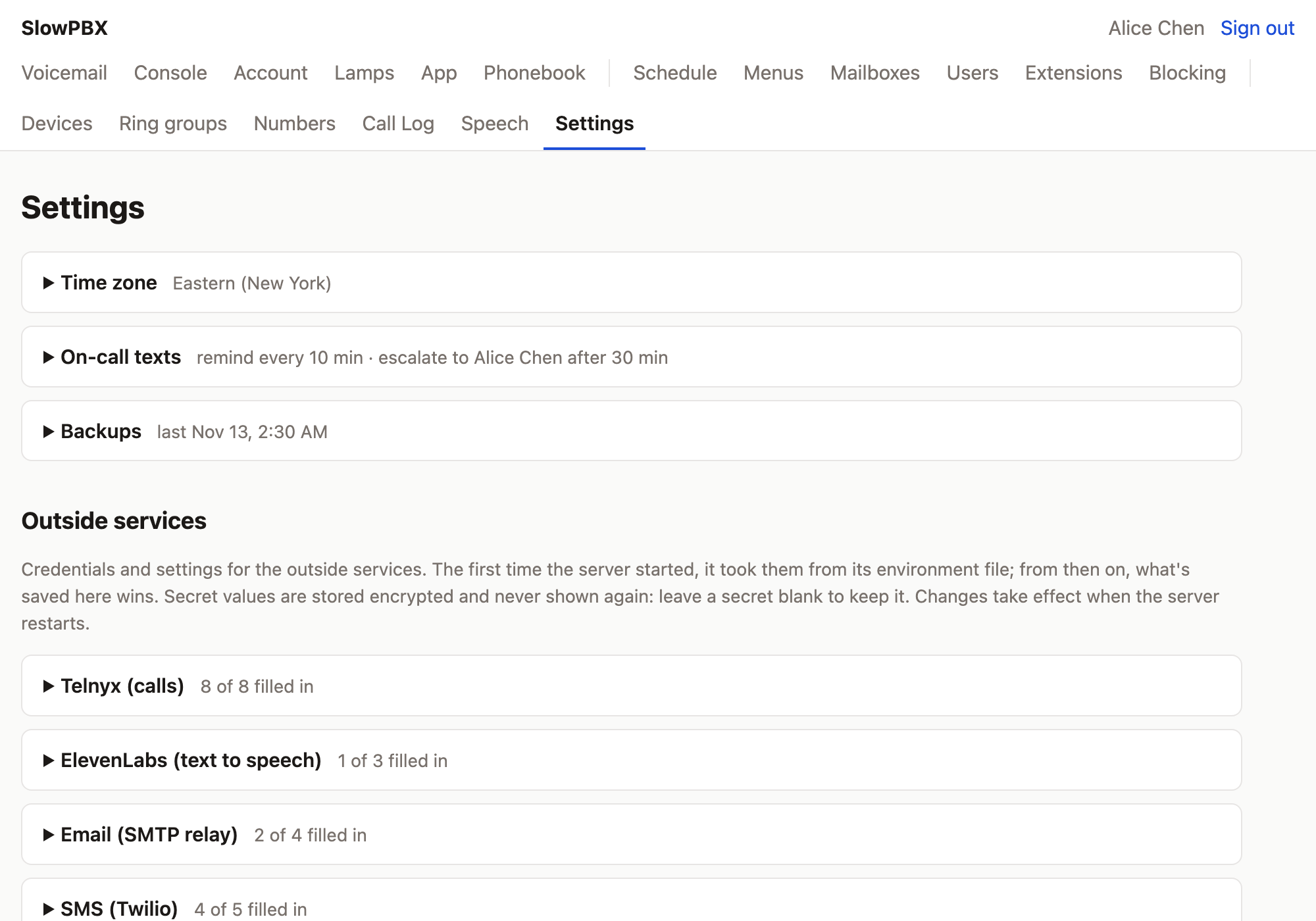
Time zone
The office’s time zone. Every date and time on the web pages is shown in it, schedules run by it, and the desk phones’ clocks follow it. A change is used at once.
On-call texts
How the person on call is chased when an urgent message arrives in the on-call mailbox. Changes are used at once.
| Remind every (minutes) | How often the notice repeats until the person checks voicemail. Ten, as it comes. |
|---|---|
| Escalate after (minutes) | How long reminders go unchecked before a second person is told. Thirty, as it comes. |
| Escalate to | That second person: any active user with a mobile number. Usually the owner. |
| Also text every new on-call message to | Someone who gets a copy of every notice, saying whom it went to. Useful in the first weeks, to see that notices go out. |
The notices say that a message is waiting and in which mailbox. They never say who called.
Backups
A status line, with nothing to change: when the last nightly backup was made and how big it was, or that backups are off or overdue. Below it, each morning’s report from the office’s server: which backup it collected and whether it restored. Backups and recovery.
Outside services
The accounts SlowPBX uses at other companies. A few rules hold for every section:
- Secrets are never shown again. A saved key or password shows only that it is set and its last few characters. Leave the field blank to keep it, type to replace it, or tick Clear it.
- They are stored encrypted, locked with the server’s master key.
- Changes wait for a restart. A saved value the server isn’t using yet is marked “restart to apply”. See restarting.
- Every change is recorded with who made it, never with the value.
Telnyx (calls)
| API key | From the Telnyx portal. SlowPBX uses it to control calls and to make each phone’s login. |
|---|---|
| Webhook public key | The account’s public key, used to check that a message about a call came from Telnyx. |
| Voice API application ID | The application calls to your numbers arrive on. |
| Desk phone connection ID | The connection desk phones register to. Without it, desk phones can’t be added. |
| Softphone connection ID | The connection the apps sign in to. |
| Caller ID number | Your company’s number, shown on outside calls. |
| 911 callback number | The number your office address is registered on for 911. |
| 911 connection ID | The connection desk phones place 911 and 933 on. Blank, a desk phone that dials 911 only plays a warning. |
How to create each of these at Telnyx.
ElevenLabs (text to speech)
| API key | Turns on the office voice, for typed greetings and menu prompts. |
|---|---|
| Model | Leave blank for the usual one. |
| Daily character limit | A ceiling on how much new text is spoken in a day. 50,000 if left blank. |
The text of a greeting or prompt is sent to the speech service, so nothing private belongs in one. The voice itself is chosen on the Speech page.
Email (SMTP relay)
| Relay | The mail relay’s host and port, for example smtp.example.com:587. The connection must be encrypted. |
|---|---|
| From | The address notices come from, in your own domain. |
| User name, Password | Leave both blank for a relay that accepts this server by its address. |
SMS (Twilio)
| Account SID | Your Twilio account. |
|---|---|
| API key SID, API key secret | A key limited to messaging. |
| From number | Your Twilio number. |
| Daily text limit | The most texts sent in a day. 50 if left blank. |
Texts go only to your own staff’s registered mobile numbers. At Twilio, limit messaging to the United States and Canada.
Push relay (rings the iPhone app)
| Push key | This server’s key, from whoever supplies your iPhone app. With it, a call wakes an iPhone app that isn’t open. |
|---|---|
| Relay address | Leave blank for the usual one. |
The section says when the last push was sent. Nothing about a caller is ever sent to the relay.
Restarting
A restart hangs up every call in progress, so Restart the server waits until there are none. The page says how many calls are in progress. While it waits, new calls are still answered, and the page offers Don’t restart and Restart now, which hangs the calls up and says so. Owners and administrators are told in their apps when a restart is waiting and when it happens.
Settings that aren’t on the page
A few settings live in slowpbx.env on the server, where only someone with access to the server can change them: the master key, the host name, the lamp port, and the backup key and time. The bundle’s README lists them.
The first time the server starts, any outside service’s values found in that file are copied onto the Settings page. After that the page wins, and changing them in the file does nothing.