 SlowPBX
How it works
The handful of ideas that explain what your phone, the apps and the web pages are doing.
Extensions
Everything you can dial inside the office is an extension. There are four kinds, and one reserved range:
| A person’s extension | Rings every phone that person has: their desk phone and their apps, all at once. Unanswered calls go to their voicemail. |
|---|---|
| A shared extension | A phone that belongs to a place, not a person: the front desk, a meeting room. |
| A ring group | A number that rings several people. See ring groups. |
| A shared mailbox | A voicemail box for a team, with no phone. Its number starts with 7. See shared mailboxes. |
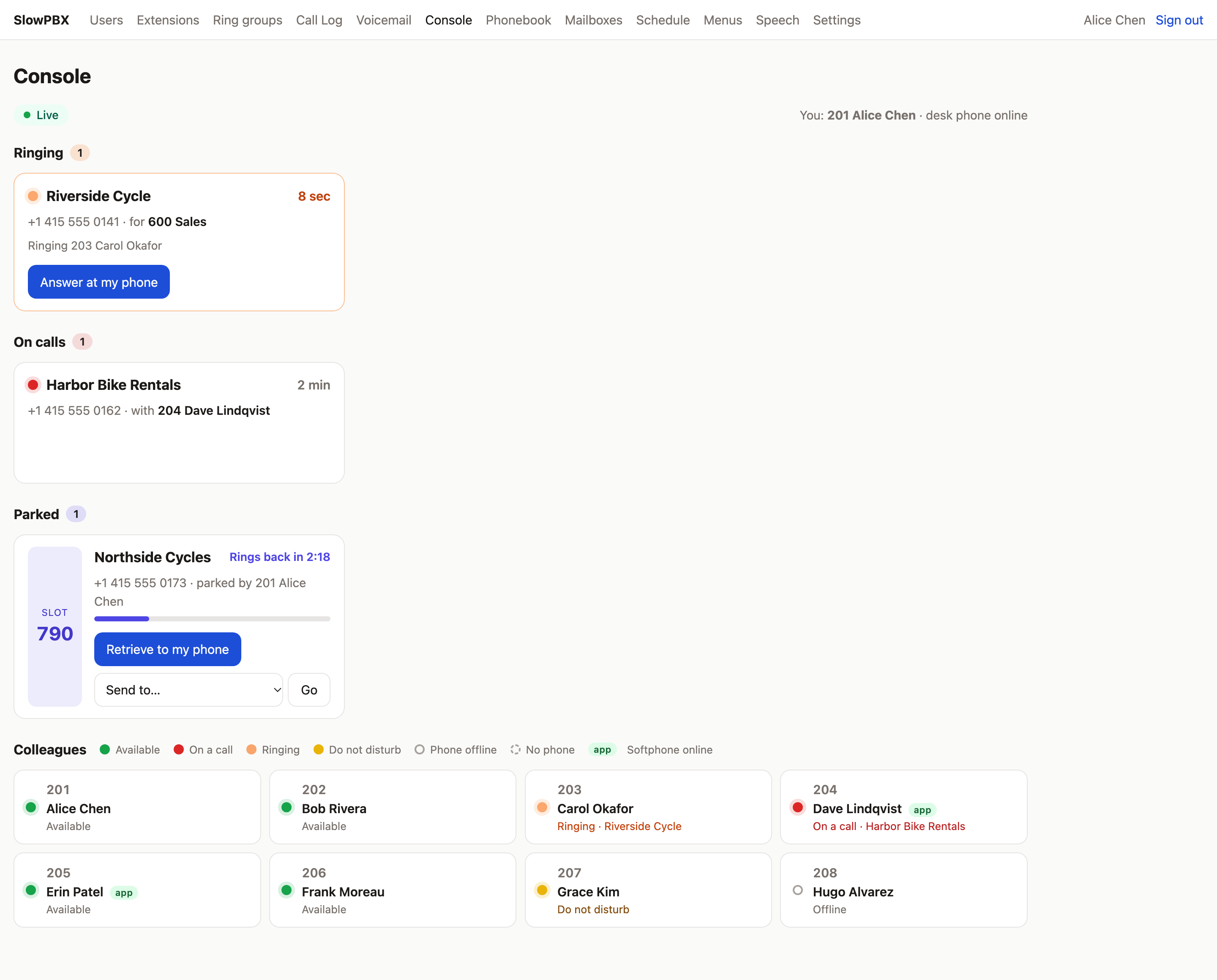
| Park slots | The numbers starting with 79 (790 and up) hold parked calls. See parking. |
Ring groups
A ring group is one number for several people, such as the front desk or billing. Your office chooses how each group rings:
| In order | The first member rings, then the second, and so on down the list. |
|---|---|
| Round robin | The same, but each new call starts one member further along, so the calls are shared out. |
| All at once | Every member rings together and the first to answer gets the call. |
A group moving from one member to the next is called hunting. While it hunts:
- A member who is already on a call is skipped.
- A member whose phone is on do not disturb, or who presses Reject, is passed over at once.
- Each member rings for a set time, about three rings unless your office changed it.
- The caller hears ringing the whole time.
When nobody answers, the call goes where the group says: usually a mailbox, sometimes another group.
Voicemail
Your mailbox takes a message when you don’t answer, when you are on another call, or when your phone is on do not disturb. The same messages are on your desk phone, in the apps and on the web pages.
- New and saved. A message is new until you hear it. The Message lamp on your desk phone counts new ones.
- Deleting moves a message to the trash. It can be restored from there for a few days (seven unless your office changed it), then it is gone for good.
- Old messages are removed after a time your office sets, 90 days as SlowPBX comes.
- Notices. When a message arrives you are sent an email. It says only that there is a message, never who called or what they said.
Shared mailboxes
A shared mailbox is one inbox for a team. Acme Bicycles, the made-up company in these examples, has a Dealer mailbox for its dealers’ questions and an On-call mailbox for urgent ones. Callers reach it from the phone menu or after a ring group nobody answered. Staff can dial its number to leave a message in it.
Each shared mailbox has members, chosen by your office manager. If you are a member:
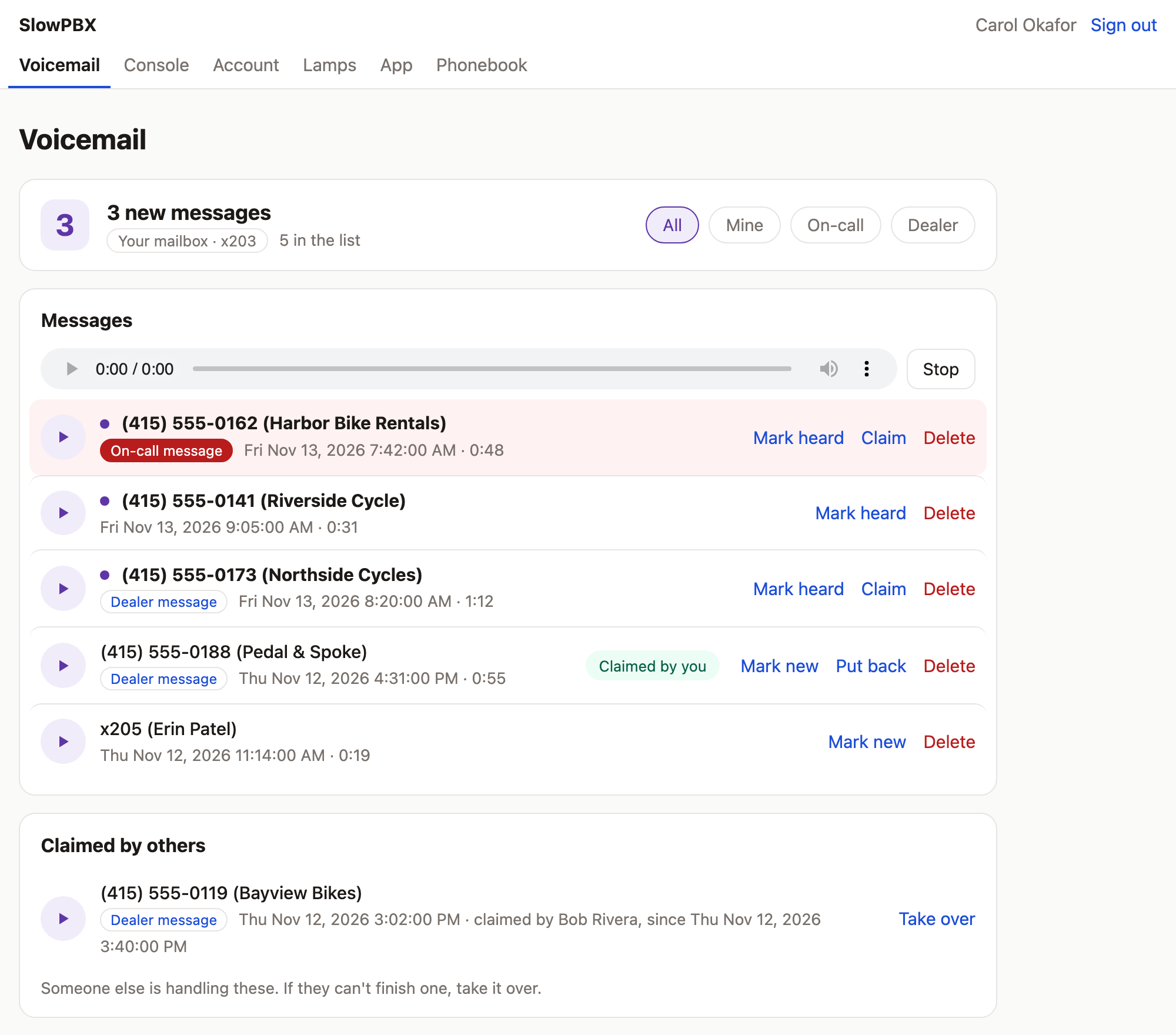
- Its messages appear with your own voicemail, each marked with the mailbox’s name. On a desk phone the message begins “From the Dealer mailbox.”
- Your Message lamp counts them along with your own.
- Heard is yours alone. When you play a shared message it becomes saved for you, and stays new for every other member until they hear it.
- Deleting one deletes it for everyone. Any member can restore it from the mailbox’s trash.
By phone, messages play in this order, so that a new shared message is never stuck behind your old ones:
- your new messages
- new shared messages
- your saved messages
- shared messages you have already heard
Claiming a message
Claiming says “I’ve got this one.” It keeps two people from returning the same call, and keeps a message from being left because everyone thought someone else had it.
| Claim | The message leaves the other members’ lists and shows as “Claimed by you”. On a desk phone, press 4 while it plays or after it. |
|---|---|
| Put it back | If you can’t deal with it after all, put it back and it reappears for everyone. On a desk phone, 4 again. |
| Take it over | The web pages list messages “Claimed by others”, with who claimed each and when. Any member can take one over if the person who claimed it can’t finish it. This is done on the web pages only. |
When the message is dealt with, delete it.
The on-call mailbox
Your office can mark one shared mailbox as the on-call mailbox, for urgent messages outside office hours. It behaves like any shared mailbox, with these differences:
- Its messages come first in your list.
- When a message arrives, whoever is on call at that moment is told at once, by text message or by an alert in the iPhone app, whichever they chose.
- The notice repeats every few minutes until that person checks voicemail, or until anyone claims the message. If it goes unchecked for long enough, a second person your office has named is told as well.
- If you were not on call when a message came in and are not on call now, you are warned before you claim or delete it. On a desk phone, pressing the same key again goes ahead.
The texts and alerts say only that there is an on-call message. They never say who called.
Parking
Hold keeps a caller waiting at your phone. Parking keeps a caller waiting in a numbered slot that belongs to nobody, so anyone can pick the call up from any phone. Use it when the caller needs someone who isn’t at their desk: park the call, then tell your colleague the slot.
The caller hears music while parked. A call nobody picks up rings back to whoever parked it. How to park and pick up on a desk phone.
Blocked callers
SlowPBX looks at every outside call before it rings anyone. A caller may be turned away, or asked to press 5 to be connected, which stops most automated calls. There are two lists:
- The company’s list is kept by your office manager and applies to every call to the office.
- Your own list applies only to calls to you. Add the last caller with *32 on your desk phone, or with Block caller on a voicemail message in the app.
If a caller you want to hear from says they couldn’t get through, tell your office manager: an owner can put a number on a list that is always let through.