 SlowPBX
Desk phones
Calling, holding, transferring and parking from a Yealink desk phone, and listening to voicemail on it.
SlowPBX sets up each desk phone by itself, so every phone in the office works the same way. The examples come from Acme Bicycles, a made-up company: Carol Okafor is extension 203, and calls park in slot 790. Your office’s numbers will differ.
The keys
The keys beside the screen are set for you:
- Your line is the first key, labelled with your extension number.
- 911 line, if your office has set it up, is the second. See 911.
- Lamp keys follow: one for each colleague you chose to see, lit by what their phone is doing.
- Park keys come last, if there is room: 790, 791 and 792, lit while a call is parked there.
The phone’s own Hold, Transfer and Message keys work as described below. A lit Message key means you have new voicemail.
Calling
| A colleague | Dial the extension: 203. |
|---|---|
| A ring group | Dial the group’s number, like an extension. |
| An outside number | Dial the area code and number: 415 555 0123. A leading 1 is fine and not needed. There is no 9 to dial first. |
| A mailbox | Dial a shared mailbox’s number (they start with 7) to leave a message in it. |
Outside calls show your company’s number, not your extension. International numbers, the operator (0) and directory assistance (411) are not connected.
911
Dial 911 from any line. It is connected before anything else and no limit or setting can hold it back. 9911 works too, for anyone used to dialing 9 first.
A desk phone taken home still tells 911 it is at the office. Away from the office, call 911 from a mobile phone. If a desk phone is all you have, say your address first. Tell your administrator before you take a phone home: they mark it as away, and its 911 key then reads “911 use cell” as a reminder.
The 911 line key opens a second line that reaches 911 even when the SlowPBX server can’t be reached. Pressing the key calls nobody: press it, then dial 911.
Answering
Lift the handset, or press the speaker or headset key. To turn a call away, press Reject: the caller goes on to whatever comes next, usually your voicemail or the next person in a ring group.
Hold
Press Hold. The other person hears music. Press Hold or Resume to come back.
Hanging up while someone is on hold ends the call. To leave a caller waiting for someone else, park the call.
Transfer
Calls can be transferred to an extension, a ring group or a mailbox. They can’t be transferred to an outside number.
Warm: speak to your colleague first
- Press Transfer, dial the extension, then #. For example Transfer 203 #.
- The caller hears music. You hear ringing, then your colleague.
- Hang up to hand the caller over.
- To go back to the caller without transferring, press *0.
- If your colleague doesn’t answer, or hangs up, you hear “There is no answer. You are back with your caller.”
- If you hang up while it is still ringing, the caller is sent on anyway, as a blind transfer.
The Transfer key keys *3 for you; dialing *3 203 # on the keypad is the same thing.
Blind: send the caller straight over
During the call, dial *2, the extension, then #: *2 203 #. Your phone hangs up. The caller hears ringing, and gets that extension’s voicemail if nobody answers.
Use a blind transfer for a ring group, a shared mailbox, or an extension with no desk phone. A warm transfer to one of those tells you so.
Park
Parking puts a caller on hold in a numbered slot, so that anyone in the office can pick the call up from any phone.
To park
During the call, dial *7. You hear the slot, for example “Parked on 7 9 0”, and your phone hangs up. The caller hears music. Tell your colleague the slot.
To pick up a parked call
- Press the lit park key. Your phone rings a moment later; answer it.
- Or dial the slot: 790.
- Or dial *7 by itself for the call that has been parked longest.
A call nobody picks up rings back at the phone that parked it, after about three minutes unless your office has changed the time. If every slot is taken you hear “No park slot is free” and stay on the call.
Lamp keys
A lamp key shows a colleague’s phone:
| Green | Free. |
|---|---|
| Red | On a call. |
| Flashing red | Ringing. The screen shows who is calling them. |
To take a colleague’s ringing call, press their flashing key. Your own phone rings with the call a moment later; answer it. Pressing a lamp key that isn’t flashing does nothing: to call the person, dial their extension.
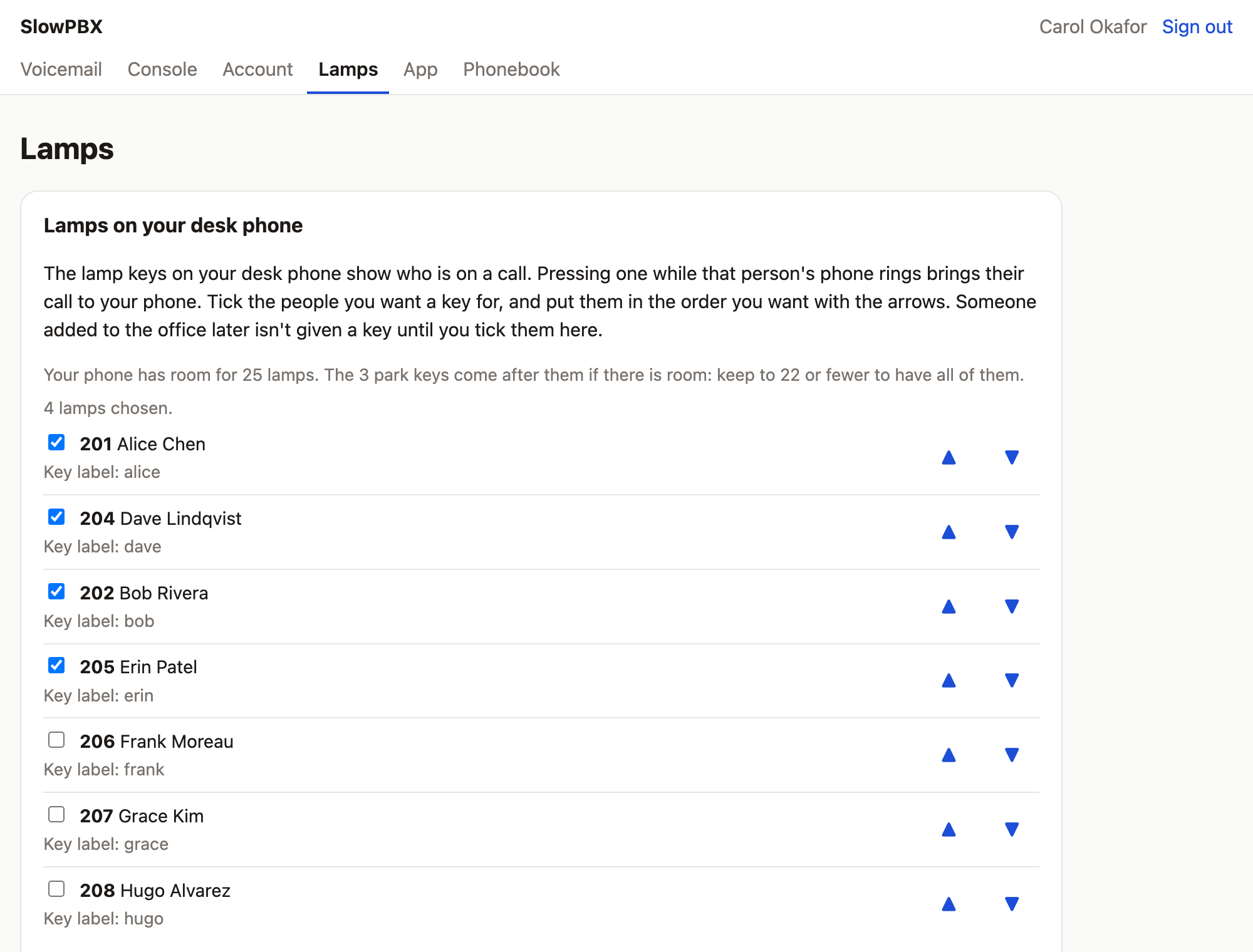
To choose your lamps, sign in to your office’s SlowPBX web pages and open Lamps. Tick the colleagues you want and put them in order. Your phone changes its keys within a moment, or after your current call.
Pickup
Without a lamp key you can still take a call that is ringing somewhere else:
- ** and the extension, for example **203, takes the call ringing at that extension.
- *8 takes the call that has been ringing longest anywhere in the office.
With nothing ringing you hear “There is no call to pick up.”
Do not disturb
Press the phone’s DND key. Calls to your extension go straight to your voicemail, and a ring group passes over you to the next person. Press it again to turn it off. It applies to that phone only.
Voicemail
Press Message, or dial *97 or your own extension. From your own phone no PIN is asked. You hear how many messages you have, then each one: new messages first, then new messages in your shared mailboxes, then saved ones.
| Key | What it does |
|---|---|
| 1 | Play the message again. |
| 2 | Save it. A message you hear to the end is saved anyway. |
| 3 | Call the person back, on the same call. They see your company’s number. |
| 4 | Claim a shared mailbox’s message, or put back one you claimed. See claiming. |
| 7 | Delete it. It can be restored from the trash on the web pages for a few days. |
| # | Skip to the next message. |
| 0 | Mailbox options: record your greetings. |
| * | Open another mailbox: its number, then its PIN and #. |
You can press a key while a message is playing; you don’t have to wait for the end.
Greetings
Press 0 in the voicemail menu, then:
| 1 | Record the greeting callers hear when you don’t answer. |
|---|---|
| 2 | Record the greeting callers hear when you are on another call. |
| 3 | Record a temporary greeting, for a day out or a holiday. While it is on, callers hear it and no other. |
| 4 | Turn the temporary greeting off. |
Speak after the tone and press # when you finish. You hear it back, then 1 keeps it, 2 records it again and 3 cancels. You can also type a greeting on the web pages and have it spoken for you.
Your voicemail from a colleague’s phone
Dial *97, press *, then your extension, your PIN and #. You set the PIN on the Voicemail page of the web pages. After several wrong PINs the mailbox locks for a while.
Block a caller
After an unwanted call, dial *32. The last outside number that rang your extension is blocked from calling you. Your list, with a button to unblock each number, is on the web pages: Account, then Blocked callers.
All the codes
| Dial | When | What it does |
|---|---|---|
| 911 | Any time | Emergency services |
| *97 | Phone idle | Your voicemail |
| 790 | Phone idle | Pick up the call parked in slot 790 |
| *7 | Phone idle | Pick up the call parked longest |
| **203 | Phone idle | Take the call ringing at extension 203 |
| *8 | Phone idle | Take the call ringing longest |
| *32 | Phone idle | Block the last outside caller |
| *7 | On a call | Park the caller |
| Transfer 203 # | On a call | Warm transfer to 203; hang up to complete |
| *0 | During a warm transfer | Cancel and go back to the caller |
| *2 203 # | On a call | Blind transfer to 203 |